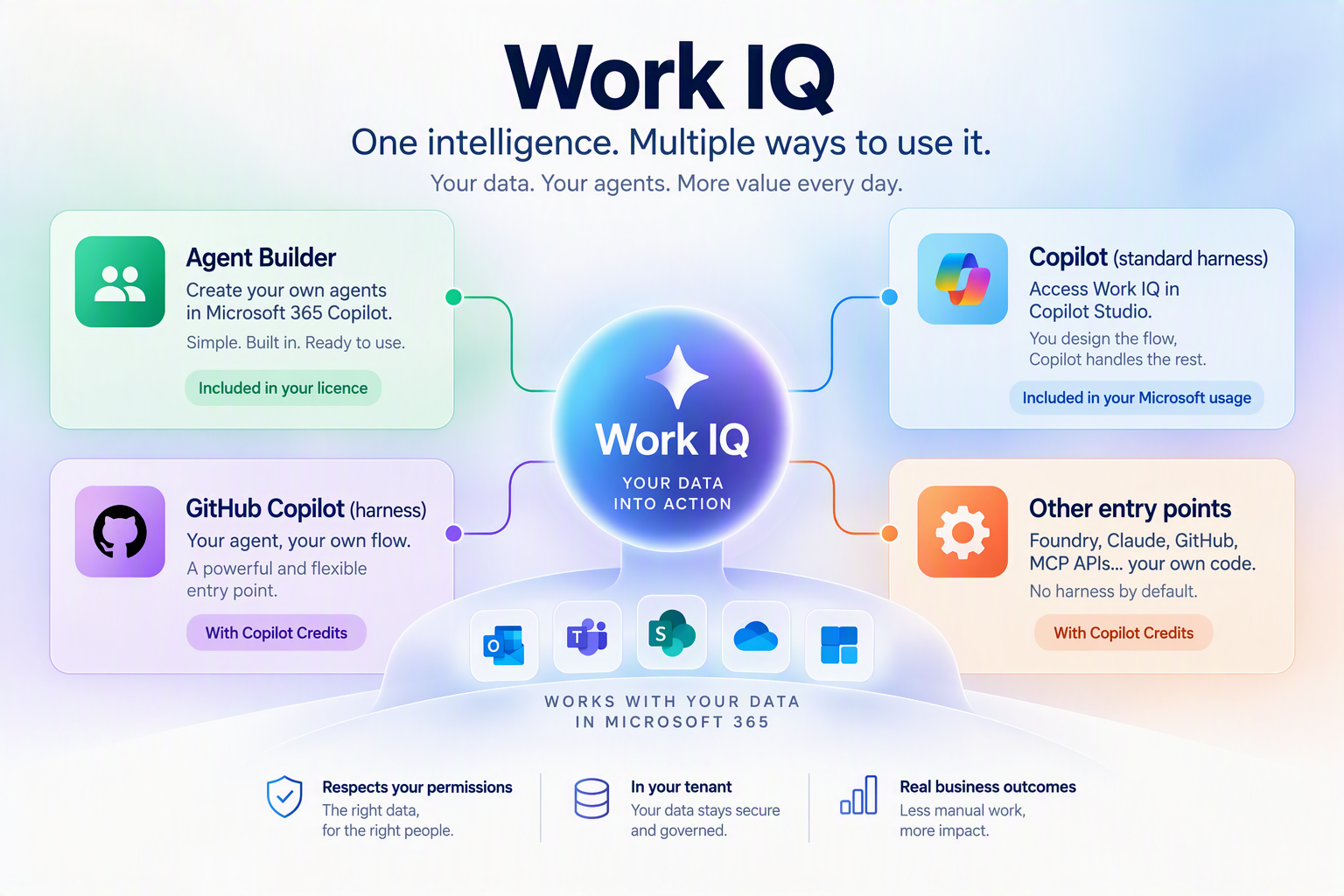
You build two agents that can search your company’s data. They use the same intelligence, but they may not follow the same billing model.
That is the key point with Work IQ: what the agent does matters, but where you build it and how it accesses your data matter just as much.
What is Work IQ?
Work IQ is the intelligence layer that helps Copilot and agents understand company information stored in Microsoft 365.
In practical terms, Work IQ can:
- find information by meaning, even when the exact words are not used;
- respect each user’s existing access rights;
- bring together information from different sources to produce a useful answer;
- give an agent controlled access to company data.
Work IQ does not give an agent access to everything. The agent can only retrieve information that the person running it is already allowed to view.
The difference starts with how you build the agent
Imagine that you want an agent to find information across Microsoft 365.
With Agent Builder, the agent runs directly inside Microsoft 365 Copilot. Access to Work IQ is native and covered by the Microsoft 365 Copilot licence.
With a standard Copilot Studio agent, you define the process in advance. The agent accesses Outlook, Teams, SharePoint or OneDrive through the connectors and tools available for each service. It does not automatically call Work IQ.
With an autonomous agent or a custom application, Work IQ can become a tool that the agent calls when needed. This gives the agent more freedom, but that usage may be billed separately through Copilot Credits.
When do you pay?
Creating an agent does not automatically trigger Work IQ charges.
The Work IQ meter applies when the agent calls the Work IQ API directly, or when the Work IQ tool has been added to its environment.
This makes costs harder to predict for an autonomous agent that can launch many searches without human intervention.
The trap to avoid
Copilot Studio and Work IQ use separate meters.
You may limit an agent’s credits in Power Platform without limiting its Work IQ consumption. The two budgets therefore need to be monitored separately.
Before moving into production, check:
- how the agent accesses Microsoft 365 data;
- whether the Work IQ API is really required;
- where spending limits are configured;
- whether access rights in SharePoint, Teams and OneDrive are properly controlled.
Which option should you choose?
The right choice mainly depends on the use case:
- Agent Builder for a simple assistant inside Microsoft 365 Copilot;
- standard Copilot Studio for a defined process controlled step by step;
- Work IQ through the API for a more autonomous agent that decides what to search for.
The more autonomy you give the agent, the more important cost and access controls become.
The key takeaway
Work IQ brings the same intelligence to different types of agents. But the route used to access it changes the capabilities, controls and cost.
Before choosing an architecture, ask three simple questions: Where will the agent be built? How will it access the data? Which usage meter will apply?